
Orbital manual · 16 HP
Orbital Uno
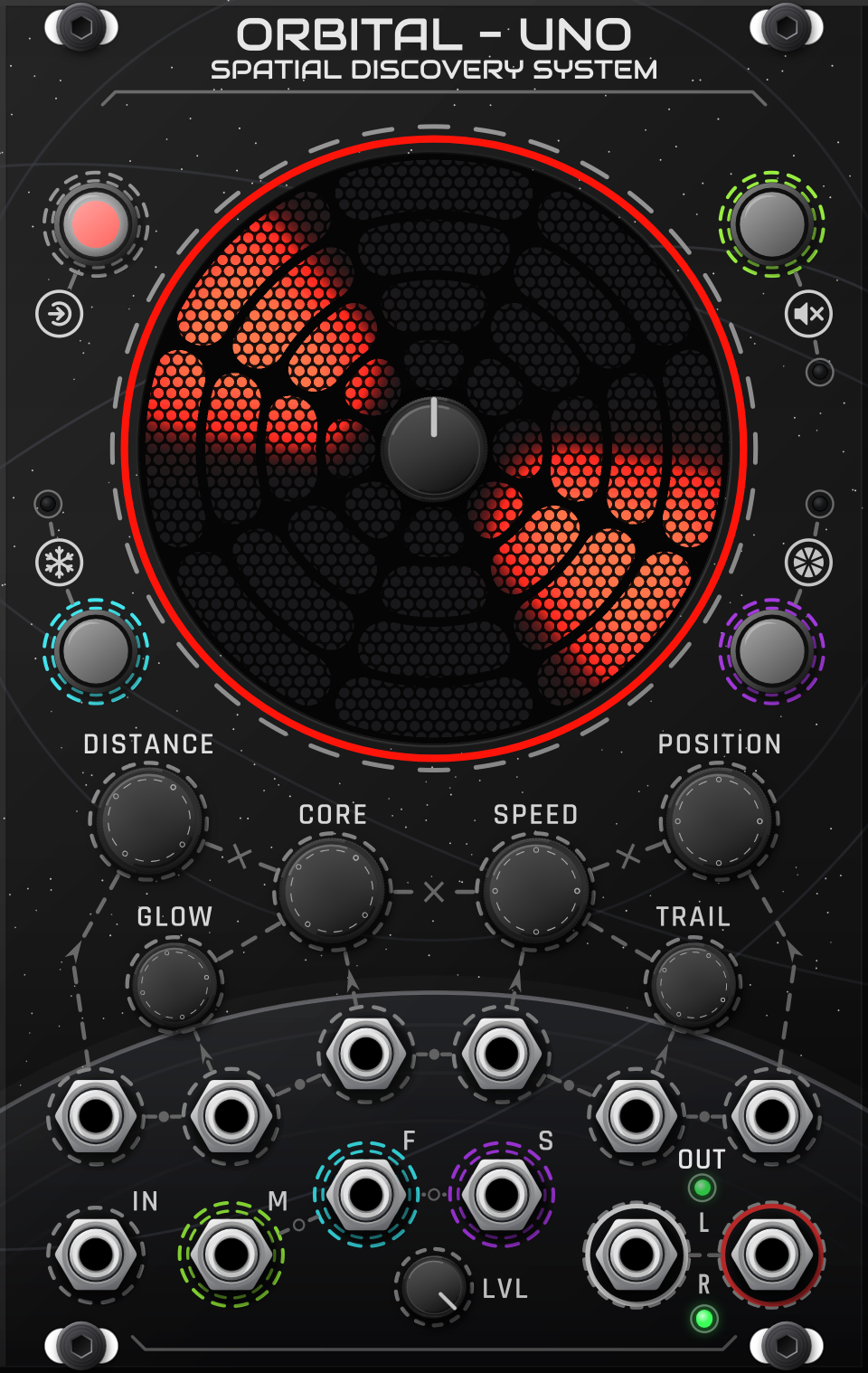
The heart of Orbital: it holds the spatial scene, plays its own source and renders every source to stereo or binaural.
Uno sounds good in both. It starts in stereo for speakers; for the binaural 3D sound it was designed around, put on headphones and tick in the right-click menu.
The visualizer
The round display shows the listener in the middle and every satellite in its source’s colour, exactly where you hear it. It draws the same position values the audio uses, so what you see is what you hear.
- The outer LED strip shows the placement cursor and which sources are selected.
- Orbit view (right-click › Look) switches to a radar-style view with each source on its own lane.
- With no satellites and nothing touched for a while, a screensaver plays. Touching anything stops it.
Centre knob (placement)
| Gesture | What happens |
|---|---|
| Turn | Moves the placement cursor around the circle. |
| Press | Places a satellite of each selected source at the cursor, or removes the one that is there. |
| Hold | Deletes all satellites of the selected sources. |
Knobs
Each knob acts on all selected sources and has a CV input. CV acts like a hand on the knob: it adds to where the knob is set.
| Knob | What it does | CV |
|---|---|---|
| Distance | How near or far the source sits. Far away is quieter and darker, as in real life. It is a placement control, not a volume knob. | 0–10 V = 0–100% |
| Speed | How fast the constellation orbits. Left = anticlockwise, centre = still, right = clockwise. | ±5 V = full sweep (amount in the menu) |
| Core | The width of each satellite, from a point to a wide band of sound. | 0–10 V = 0–100% |
| Glow | An airy, shimmering halo around each satellite. | 0–10 V = 0–100% |
| Trail | A fading comet tail of echoes behind each moving satellite. | 0–10 V = 0–100% |
| Position | Endless. Rotates the whole constellation around the listener. | 10 V = one full turn |
| LVL | Level trim for Uno’s own source. | — |
With Show CV modulation on (right-click › Look), an arc by each knob shows how far its CV is moving it, in the source’s colour.
Buttons
The four buttons around the visualizer act on the selected sources and use the same gestures on Uno and every MAS.
| Button | Tap | Hold |
|---|---|---|
| Select | Adds Uno’s source to the selection or takes it out. Double-click = only this source. | Select all / clear all (or Ctrl+click) |
| Freeze | Stops the motion; satellites stay where they are while the sound plays on. Tap again to release. | Frozen while held |
| Mute | Click-free mute. Tap again to unmute. | Muted while held |
| SNAP | Lit = satellites jump from sector to sector. Unlit = smooth motion. | — |
The M, F and S CV inputs control Mute, Freeze and SNAP for Uno’s own source. A trigger acts like a tap, a gate like holding the button.
Lights
- Status lights by each button always show Uno’s own source: Mute green, Freeze cyan, SNAP purple.
- Active (by the outputs): lit when Uno’s L/R jacks are the live output. It goes dark when Bypass takes over.
- Level: green = signal, yellow = the safety limiter is touching (above 8 V), red = limiting you can hear (above 10 V).
Inputs and outputs
- IN: the source audio, at line level (±5 V). A polyphonic cable puts one channel on each satellite (1, 2, 1, 2…). Stack cables to mix them.
- L / R: the finished stereo or binaural mix of every source (Uno and all MAS). Send it straight to your audio output; effects after it can ruin the 3D image (see Keep the output clean).
Right-click menu
- Output: Binaural: a new Uno starts in stereo, for speakers. Tick it for binaural on headphones: the immersive mode Orbital was designed around. Both sound good.
- Look: visualizer style, Orbit view, grille, LED style and brightness, CV modulation arcs, screensaver.
- Sound:
- Head shape (binaural): seven measured heads. People hear 3D differently, so try a few and keep the one where front and back are clearest.
- Stereo depth › Head: front/back tone and natural width in stereo mode.
- Auto level (stacked sources): as more sources play at once, each is turned down a little so the total stays near the loudness of one.
- Controls: select all / clear all, Select button gestures, how Freeze/Mute/SNAP act on a mixed selection, Speed CV amount, save / load slots.